BLOG
How I run several Claude Code logins at once: a guide to crewrota
Short answer: crewrota is a free, open source command-line tool I built that runs Claude Code as one of your crew members. Each member is one of your own Claude logins in its own folder, so all of them stay signed in, side by side. Members can share history through a ship, you see every member's usage on one screen, and one zip moves the whole setup to a new computer. This guide covers every part in one place and links to the longer posts.
I'm a software engineer. I run several Claude logins with crewrota, for my job and for my own projects. crewrota is how I keep them all open at once without logging out, and it is the setup I use every day.
Install
You need Node 22.19 or newer and Claude Code. Windows is the main platform, and macOS is in beta.
npm install -g crewrota
crew add work
crew add personal
crew
crew add opens Claude Code's own login for that member. crw and crewrota work the same as crew.
1. Members: one login each, side by side
Claude Code keeps its settings, history and login in one config folder, and the CLAUDE_CONFIG_DIR variable points it at another one. crewrota gives each member its own folder and runs the real claude program in it.
crewopens a menu: pick a member, its model and effort, and Claude Code starts as that login.crew <member>starts that member straight away with its saved model and effort.crew listshows every member with its ship, usage and email.- Your main
~/.claudelogin is never touched.
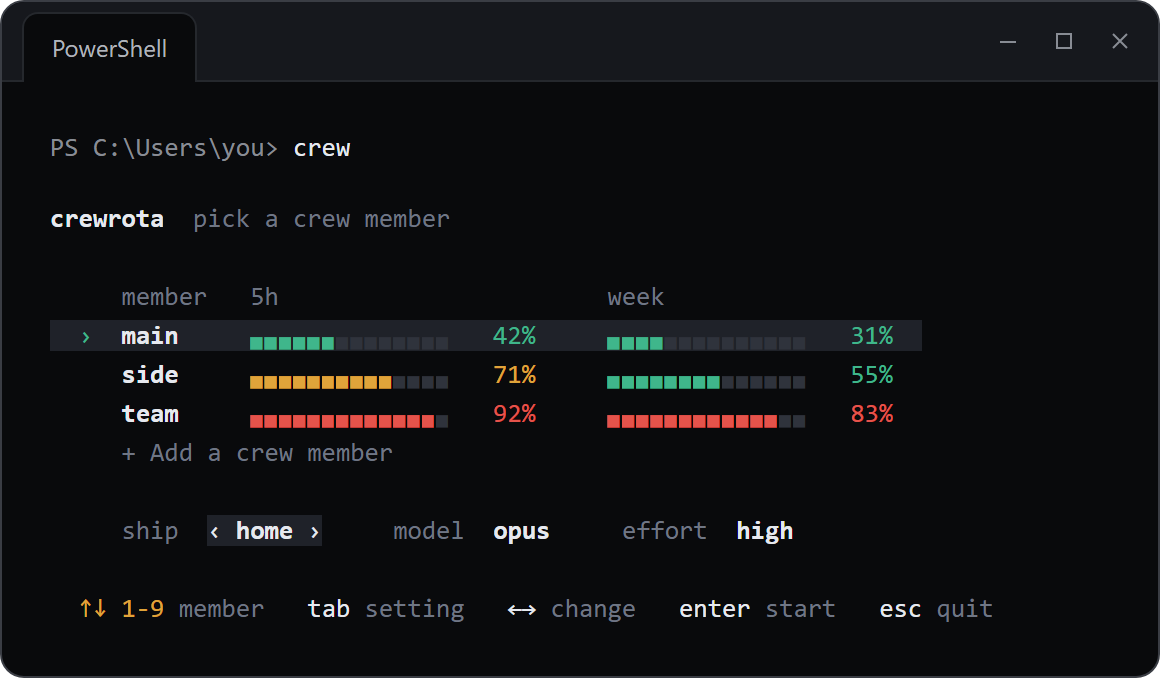
crew menu with a demo crew.Longer post: Switch Claude Code accounts without logging out (also on dev.to).
2. Ships: shared history
Each login keeps its own history, so --resume on one account cannot find a session started on another. A ship fixes that: members on the same ship share history and memory, so --resume in one member finds a session another member started. A ship also gives its members the same MCP servers.
crew ship join work home
crew ship join personal home
Keep work and personal on separate ships if you want their history apart.
3. Usage at a glance
crew quotashows every member's 5-hour and weekly bars on one screen, and thecrewmenu shows the same bars.crew widgetputs them in a small always-on-top window on your desktop, with today's token count, the clock and a coding-music link.crew warmupsends each member one short Haiku message, which starts its 5-hour window if none is running. It is a real message and counts as usage.
4. Your setup in every member
Your skills, agents, commands, plugins, settings and CLAUDE.md from ~/.claude come with every member. crewrota links or copies them into each member; your main folder is only read.
5. VS Code shortcuts
crew shortcut add <name> --member <m> writes a VS Code workspace file that opens a folder and starts that member there. On Windows it also adds a Start Menu entry, with an optional hotkey such as CTRL+ALT+C.
6. Hand a task to another member: firstmate
The crewrota plugin adds /firstmate to your main Claude Code. It hands a task to other members running in their own git worktree, and nothing is committed without your word.
claude plugin marketplace add pasindu-premachandra/crewrota
claude plugin install crewrota@crewrota
7. Move everything to a new computer
crew backup --password writes one encrypted zip with your ships' history, your members and settings, every skill and each project's .claude folder with its tasks and memories. crew restore puts it all back on the new machine, and --clone clones each repo too. Logins are never in it.
Longer post: Move Claude Code to a new computer.
8. Set up and check
crew setupinstalls the default tools from upstream: one list, one yes.crew initwrites a project's root.claude/folder, never overwriting a file.crew doctorchecks Node, Claude Code, the folders, every link and each default tool.
Your accounts and Anthropic's terms
crewrota is for one person using their own Claude subscriptions. Each member logs in through Claude Code's own login, and crewrota never copies or moves a login; to read usage, quota-axi uses each member's own sign-in on your machine. Read Anthropic's Consumer Terms and Usage Policy for your plan before you use more than one account.
Every crewrota post
- On the crewrota site: crewrota.pasindug.com/blog
- On dev.to: dev.to/pasindu_g
- Every command: docs/commands.md on GitHub
Questions about crewrota
What is crewrota?
A free, open source command-line tool that runs Claude Code as one of your crew members: one Claude login per member, each in its own folder, all signed in side by side.
Is crewrota free?
Yes. It is open source under the MIT license, on npm and GitHub.
Does it work on macOS?
Windows is the main platform. macOS is in beta.
If you try it, I'd like to hear what breaks: open an issue on GitHub.